How to open a CSV file on Windows, Mac, iPhone and Android
Spreadsheet tools · Published
Free ways to open and read CSV files on any device, including files too large for Excel, without mangling the data.
The short answer
A CSV file is plain text, so every device can open it. On a computer, any spreadsheet app (Excel, Numbers, LibreOffice Calc or Google Sheets) shows it as a table, and any text editor shows the raw lines. On a phone, Numbers on iPhone and Google Sheets on Android open CSVs for free.
The catch is that spreadsheet apps change what they show: they drop leading zeros, turn codes into dates and may put everything in one column. To see a file exactly as it is, or a file too big for Excel, use a viewer such as Filecon's CSV viewer, which works in the browser on any device.
| Device | Built-in or free | Also works |
|---|---|---|
| Windows | Notepad, LibreOffice Calc (free download) | Excel, Google Sheets |
| Mac | Numbers, TextEdit, Quick Look | Excel, LibreOffice Calc, Google Sheets |
| iPhone and iPad | Files app preview, Numbers | Google Sheets app, Excel app |
| Android | Google Sheets app, Google Drive preview | Excel app |
| Any browser | Filecon CSV viewer | Google Sheets |
Windows
Excel
If Excel is installed, double-clicking a .csv file usually opens it in Excel. That's fine for a quick look, but Excel converts values as it opens them. For files with IDs, ZIP codes or long numbers, import instead:
- Open a blank workbook and go to Data › From Text/CSV.
- Choose the file and select Import.
- Check the Delimiter and File Origin (the text encoding) in the preview, then select Load.
Notepad
Right-click the file and choose Open with › Notepad. You see the raw text, which is the quickest way to check what the file really contains. Very wide files are hard to read this way.
LibreOffice Calc (free)
- Open Calc and choose File › Open, then pick the CSV.
- The Text Import dialog opens. Choose the separator and the character set.
- To keep leading zeros, select a column in the preview and set its type to Text. Then select OK.
Mac
Numbers
- Drag the CSV onto the Numbers icon, or right-click it and choose Open With › Numbers.
- If the columns look wrong, click the table, open the Format sidebar, choose Table and click Adjust Import Settings.
- On the Delimited tab, pick the delimiter and text encoding, then click Update Table.
Adjust the import settings before you edit anything; Apple notes they can't be changed afterward.
TextEdit, Quick Look and Excel
Select the file in Finder and press the Space bar for a quick preview, or right-click it and choose Open With › TextEdit to see the raw text. Excel for Mac opens CSVs too, with the same conversions as on Windows.
iPhone and iPad
Preview in the Files app
- Save the CSV to Files (from Mail or Messages, tap the attachment, then Share › Save to Files).
- Open the Files app and tap the file for a quick, read-only preview.
Numbers
- Open Numbers, tap Browse, find the CSV and tap it. Numbers creates a new spreadsheet from it.
- If the columns are wrong, tap the table, tap the Format button, then Table › Adjust Settings.
- On the Delimited tab choose the delimiter or encoding, then tap Update.
Numbers is free from the App Store if it isn't already on your iPhone.
Android
Menus differ between phone brands and Files apps, so the steps are general:
- Install Google Sheets from the Play Store if you don't have it.
- Tap the CSV in your Files app, in Gmail or in Google Drive, and choose to open it with Google Sheets.
- Sheets shows the file as a table. Drive can also show a quick preview without Sheets.
Opening a CSV this way lets Sheets convert values, so check ID columns for missing zeros.
In a browser with Google Sheets
- Create a new spreadsheet and go to File › Import › Upload.
- Choose the file, then check the separator type.
- Clear Convert text to numbers, dates, and formulas if the file has IDs or codes, then select Import data.
This uploads the file to your Google Drive, which is worth knowing for private data.
Open a CSV in your browser with Filecon
The CSV viewer works on phones and computers, and the file is read in your browser, not uploaded. It shows every value exactly as it is in the file, with no conversions, so 00123 stays 00123 and formulas are never run.
- Open the CSV viewer and choose a .csv, .tsv or .txt file (up to 50 MB).
- Check the detected Delimiter and change it if the columns look wrong.
- Select a column name to sort, or type in a column's Filter box to find rows.
- Use Download original if you need the unchanged file back.
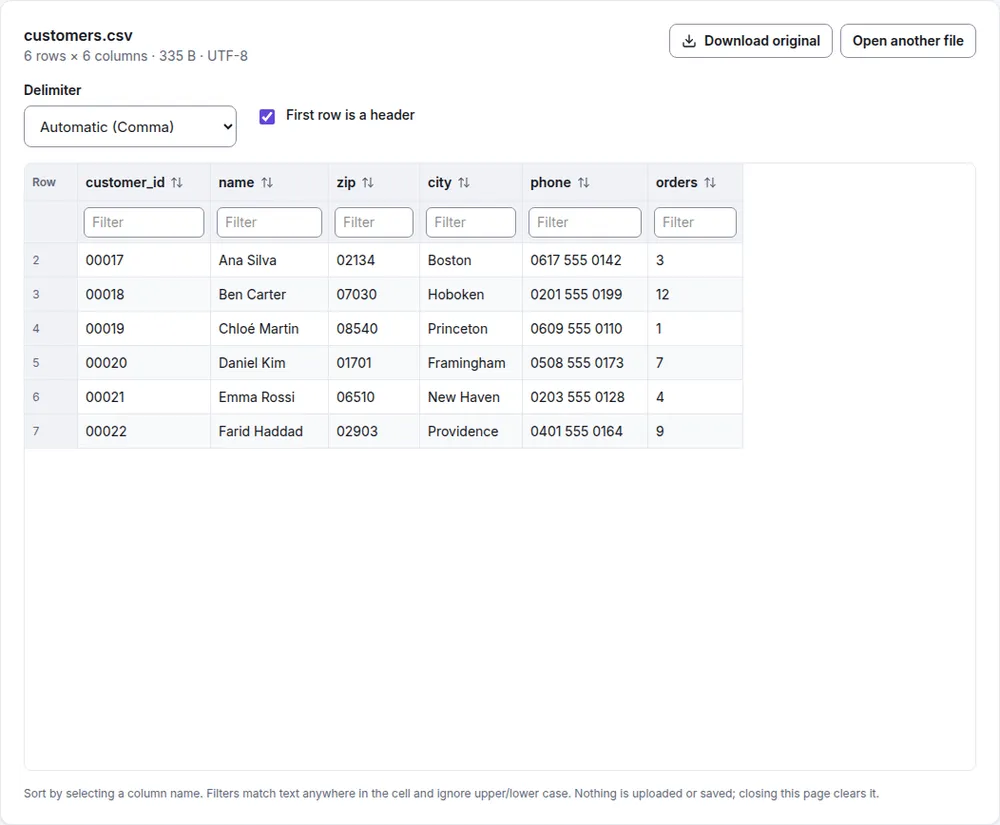
It's a viewer: you can't edit cells. To work on the data in Excel, convert it with CSV to Excel, which keeps leading zeros and long numbers as text.
Large CSV files
An Excel worksheet holds at most 1,048,576 rows, so anything longer can't be shown in one sheet. Google Sheets and phone apps become slow with large files well before that.
Filecon's viewer holds up to 500,000 rows and shows a warning from 200,000 rows, because very large tables can be slow on older phones and computers. Sorting and filtering big files run in the background, so the page stays usable. For files larger than that, a database or a command-line tool is the better choice.
Common problems
- Leading zeros disappear. The zeros are usually still in the file; the app removed them when it opened it. See how to keep leading zeros in CSV files.
- Everything is in one column. The file uses a different delimiter from the one your app expects. See comma vs semicolon delimiters.
- Accents show as odd symbols (é instead of é). The file's encoding was misread. Most CSVs today are UTF-8, but older Excel exports on Western Windows are often Windows-1252. Choose the encoding when you import (File Origin in Excel, character set in LibreOffice, text encoding in Numbers). Filecon's viewer tries UTF-8 first, falls back to Windows-1252, and shows which one it used.
Summary
Any spreadsheet app or text editor opens a CSV. Use Numbers or Google Sheets on a phone, LibreOffice Calc if you want a free desktop app, and import rather than double-click when the data has IDs or codes. For a quick, exact look at any size up to 500,000 rows, open it in the CSV viewer.